Best Budgeting Apps in USA 2026: Free vs Paid
 DollarLedger Team
- 03 Nov, 2026
The best budgeting app is not the one with the most features. It is the one you will actually open every week — at a price you are happy to pay. That choice got harder in 2024, when Intuit shut down Mint, the free app millions of Americans used. Today the best-known apps cost $75 to $109 a year, but free plans still exist. This guide compares them, with prices checked November 2, 2026.
Photo: A budgeting app should make the weekly check faster — not more expensive. (Photo: Pexels)
What You Will Learn
- What the best apps cost per year, free vs paid
- Why paying month by month costs $70 to $136 more a year
- The two kinds of apps — planners and trackers
- What happened to Mint, and what replaced it
- Which app fits your style, and how to try it free
Step 1: Look at the yearly price first
What to do: Compare what each app costs for a full year, not one month.
How: Monthly prices hide the real cost. Yearly prices, checked November 2, 2026: YNAB $109 ($14.99 a month). Goodbudget Premium $80 ($10 a month). EveryDollar Premium $79.99 ($17.99 a month). PocketGuard Plus $74.99 ($12.99 a month), or $149.99 once for life. Rocket Money Premium: you choose $7–14 a month ($84–168 a year). Free plans cost $0: Rocket Money, Goodbudget and EveryDollar.
Example: YNAB costs $109 a year; PocketGuard Plus $74.99 — about $34 less. But the cheaper app is not better if you never open it.
Common mistake: Comparing monthly prices only. $14.99 a month sounds small; $179.88 a year — what twelve payments really cost — does not.
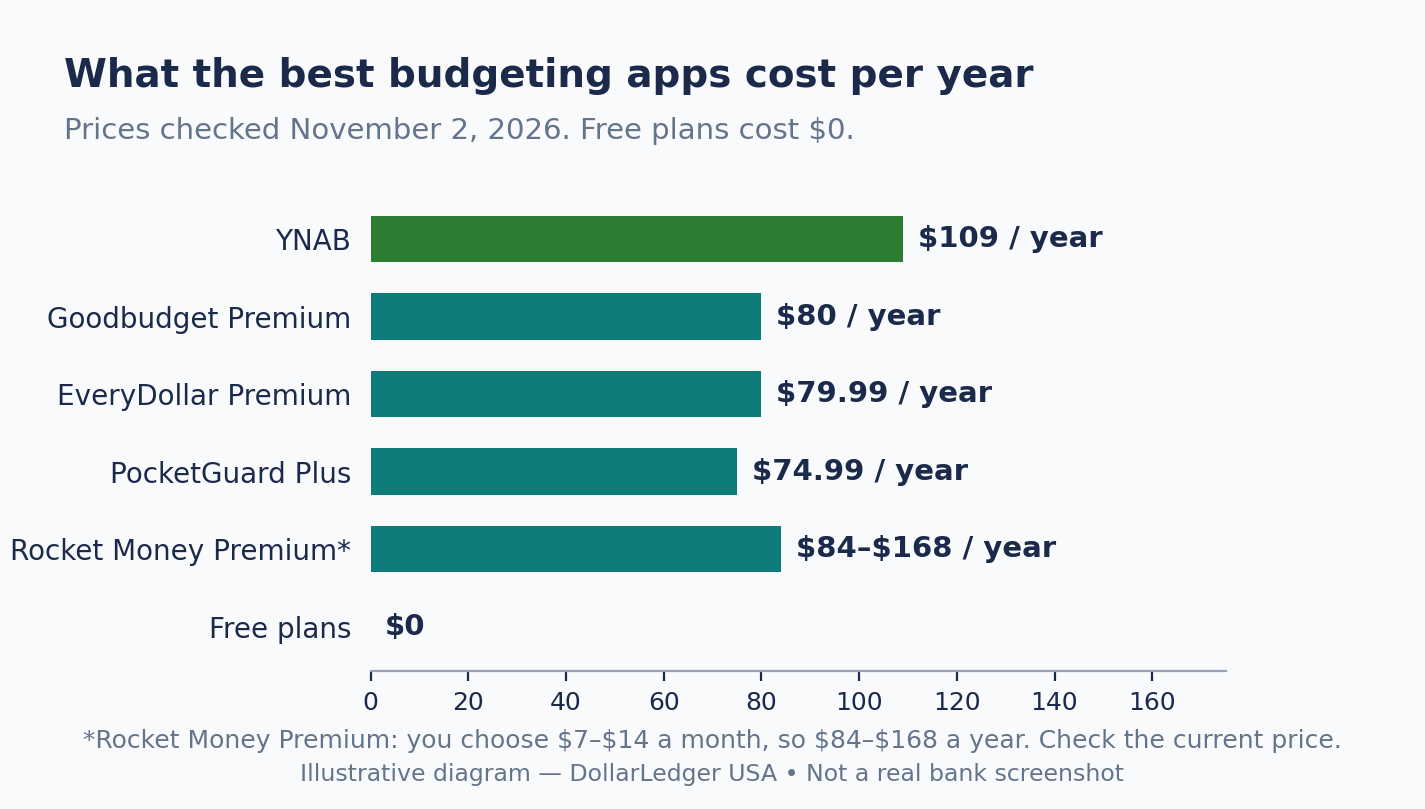
Illustrative diagram — What the best budgeting apps cost per year. NOT a real bank screenshot.
Step 2: Never pay month by month
What to do: If you pay for an app, pay yearly — monthly billing is the most expensive way to subscribe.
How: Monthly billing costs far more than the yearly plan. YNAB: $14.99 a month is $179.88 a year, $70.88 more than the $109 annual plan. EveryDollar Premium: $17.99 a month is $215.88 a year, $135.89 more than the $79.99 annual plan. PocketGuard Plus: $12.99 a month is $155.88 a year, $80.89 more than the $74.99 annual plan. Goodbudget Premium: $10 a month is $120 a year, $40 more than the $80 annual plan.
Example: Sara, from our $1,000-in-30-days example, tries YNAB for a month at $14.99, likes it, and switches to annual: $109 instead of $179.88, saving $70.88.
Common mistake: Staying on monthly billing “just for now” and forgetting it. Twelve payments quietly pass, and you have paid $70 to $136 extra for nothing. Switch to annual on day one.
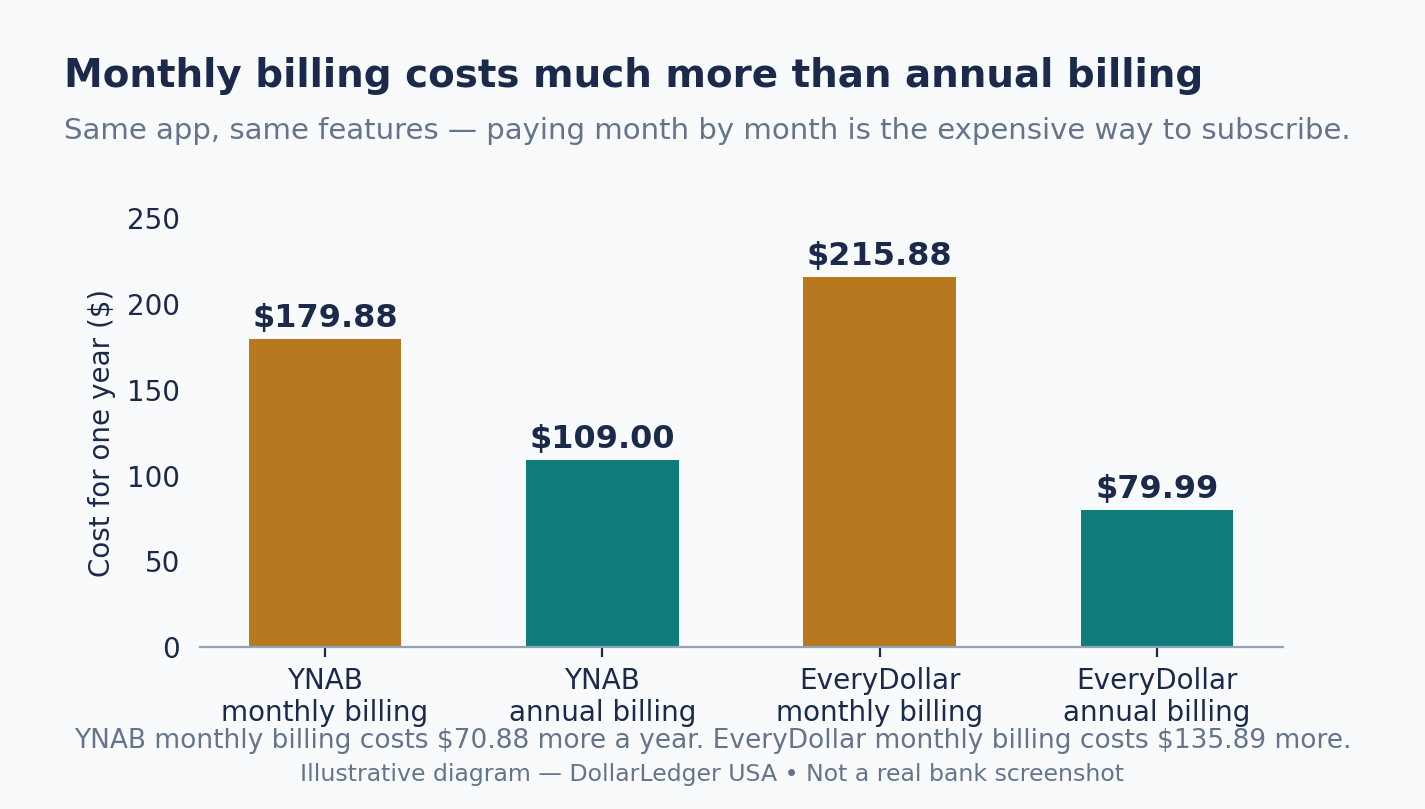
Illustrative diagram — Monthly billing costs much more than annual billing. NOT a real bank screenshot.
Step 3: Know the two kinds of budgeting apps
What to do: Learn the two kinds of apps, then pick the kind that matches you.
How: Planners make you decide where every dollar goes before you spend it: YNAB and EveryDollar use zero-based budgeting, where every dollar gets a job; Goodbudget uses digital envelopes — one for groceries, one for fun. Trackers watch your spending: Rocket Money and PocketGuard link to your bank and sort it, and PocketGuard shows one “safe to spend” number. Rocket Money also finds forgotten subscriptions. Neither kind is better. A simple split is the 50/30/20 rule: 50% needs, 30% wants, 20% saving — any of these apps can track it.
Example: Priya plans every dollar on Sunday night, so she picks YNAB. Her brother just wants to know if he can afford lunch, so he picks PocketGuard.
Common mistake: Picking the app with the most features. Features do not matter if you stop opening the app after two weeks. Pick the kind you will use.
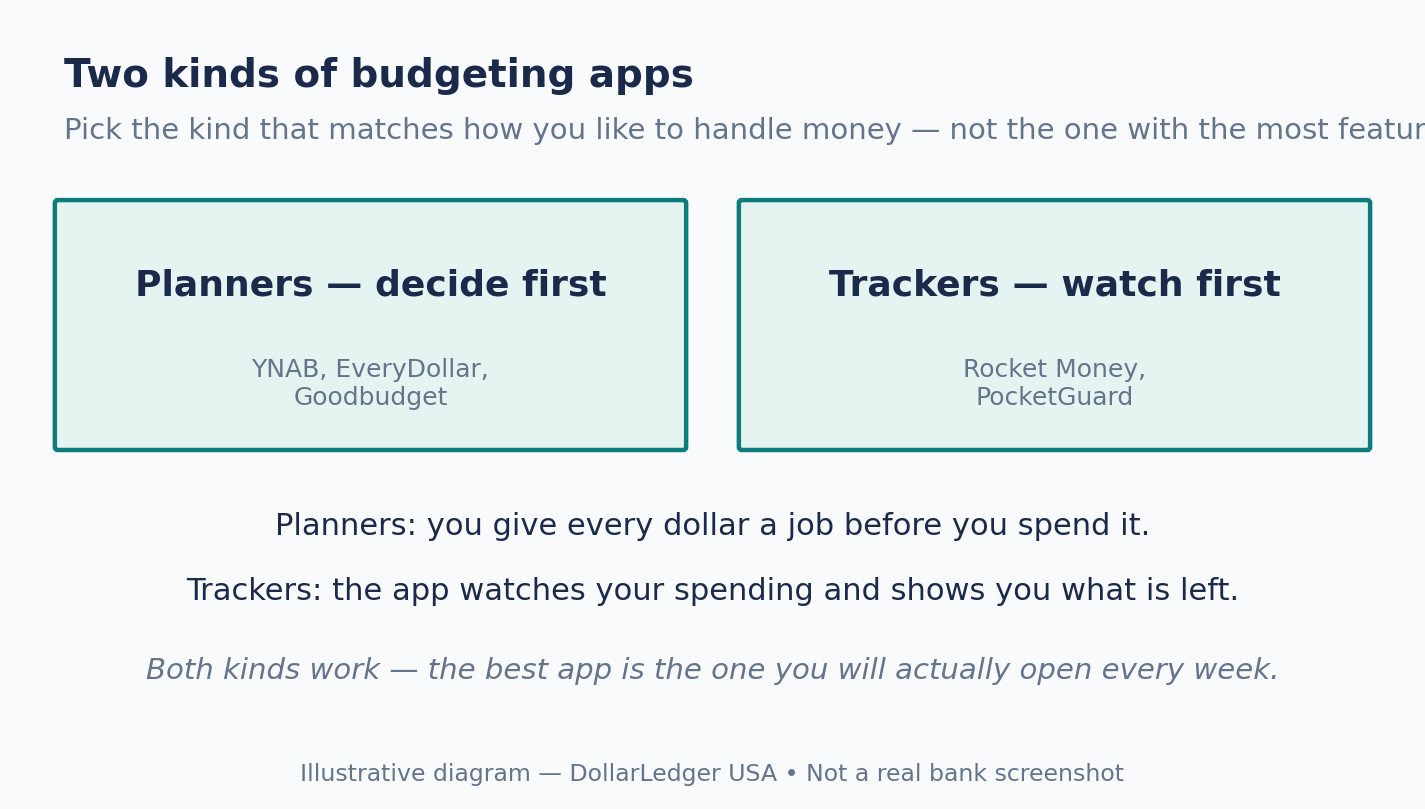
Illustrative diagram — Two kinds of budgeting apps. NOT a real bank screenshot.
Photo: Ten minutes a week is enough — if the app matches how you think. (Photo: Pexels)
Step 4: Do not go looking for Mint
What to do: If an old guide tells you to download Mint, ignore it — Mint is gone.
How: Intuit shut down Mint on March 23, 2024, after 17 years, and moved users to Credit Karma. Credit Karma tracks spending and credit, but it is not a full budgeting app — it has no category budgets like Mint did. Mint’s budgets and history were deleted. The closest dashboard replacement is Monarch Money ($99.99 a year), but it has no free plan.
Example: A 2023 article calling Mint “the best free budgeting app” is out of date. The free options that still work are Rocket Money, Goodbudget and EveryDollar (Step 5).
Common mistake: Downloading an app called “Mint” from an app store in 2026. It is not the real Mint. Only download from official websites or app stores, and check the developer name.
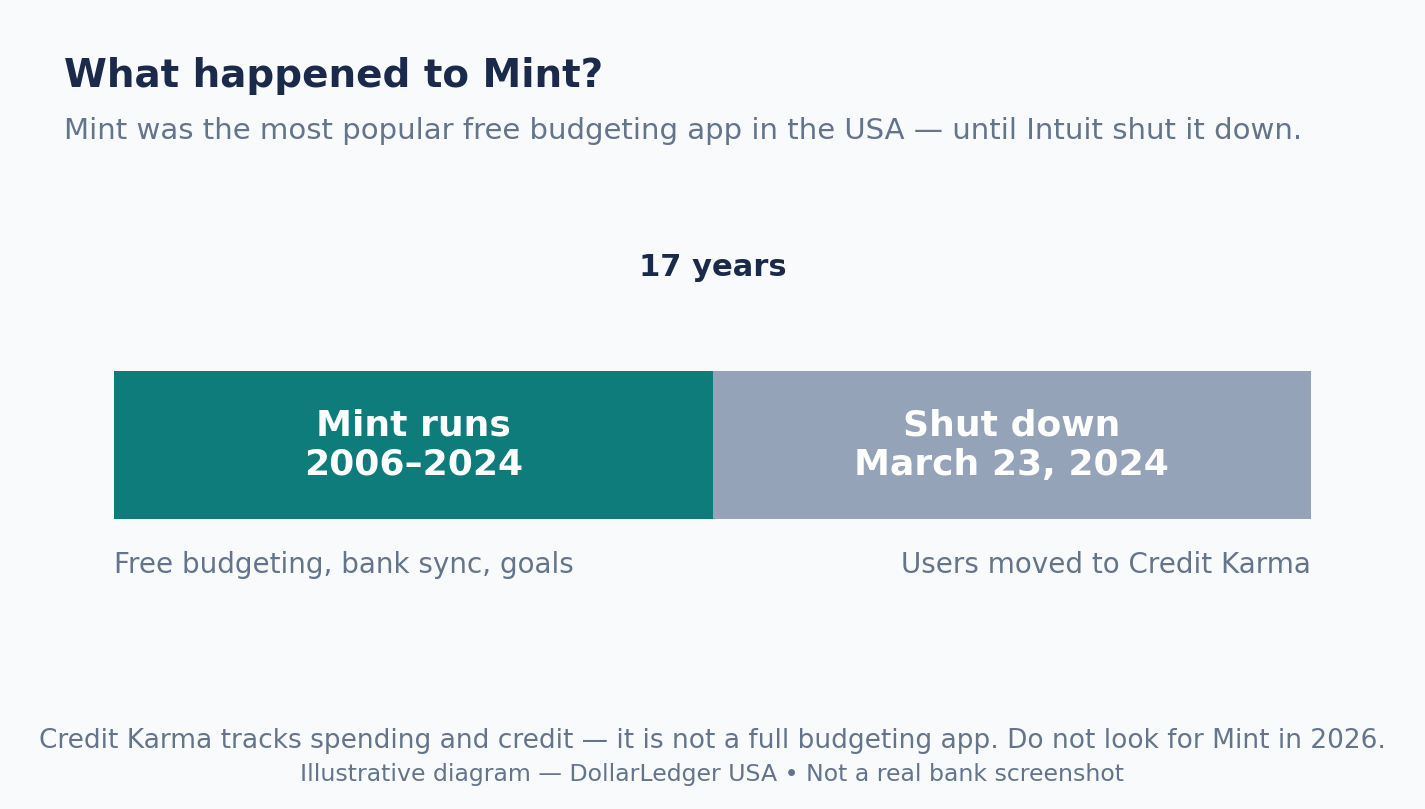
Illustrative diagram — Mint shut down on March 23, 2024. NOT a real bank screenshot.
Step 5: Pick the app that fits your style
What to do: Match the app to your style, not to someone else’s top-ten list.
How: To plan every dollar, try YNAB ($109 a year, 34-day trial, no free plan) or EveryDollar (free for manual entry; Premium $79.99 a year adds bank sync). For envelopes with no bank linking, try Goodbudget (free, 20 envelopes; Premium $80 a year). For one “safe to spend” number, try PocketGuard Plus ($74.99 a year, 7-day trial). To cancel forgotten subscriptions, try Rocket Money (free plan; Premium $7–14 a month). YNAB covers up to six people on one plan.
Example: A couple could share YNAB Together on one $109 plan. A student could use Goodbudget free or EveryDollar free and pay nothing. Five forgotten subscriptions could cost more than any paid app.
Common mistake: Paying before trying the free plan or trial. Every paid app here has one. Use it for two full weeks — including one payday — before you spend a dollar.
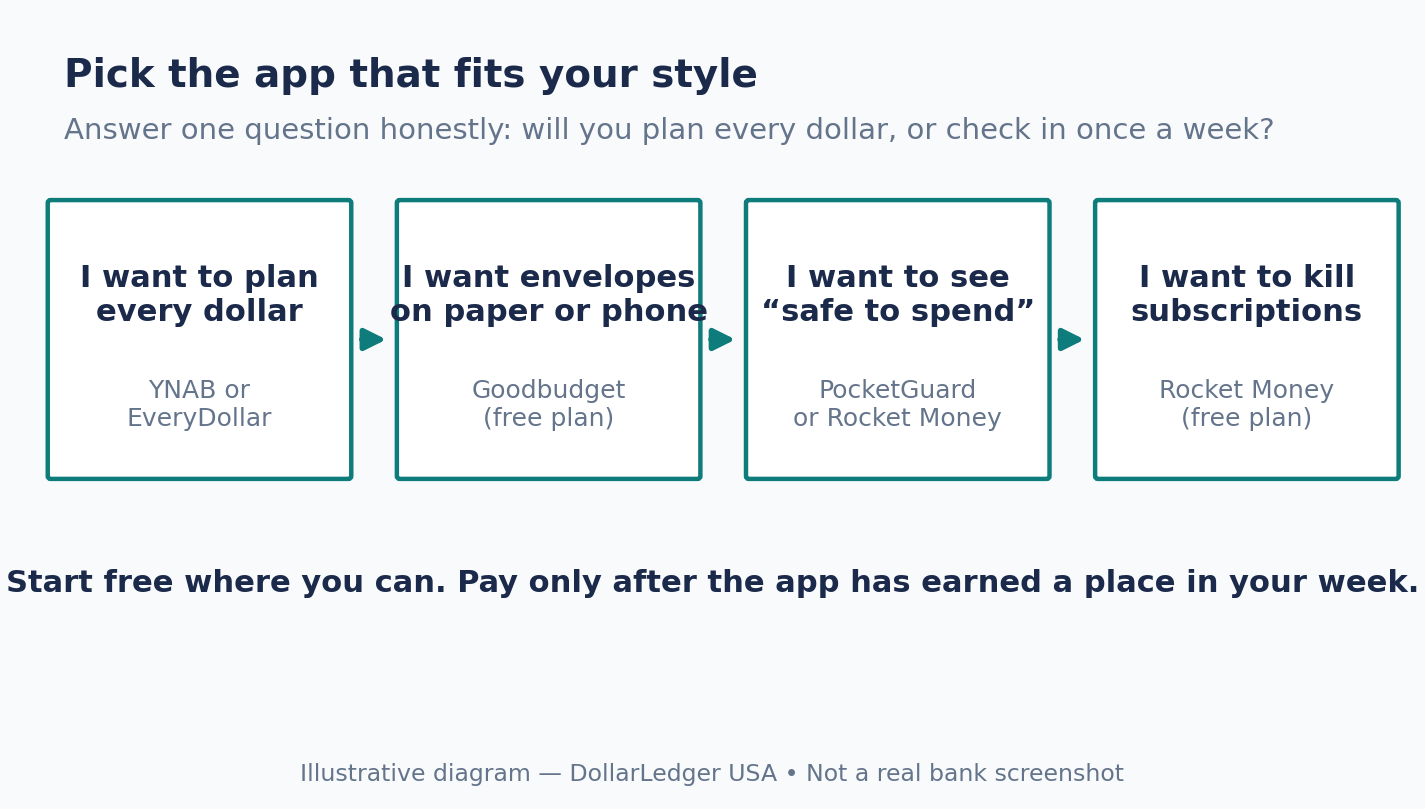
Illustrative diagram — Pick the app that fits your style. NOT a real bank screenshot.
Photo: The app is only a tool — the saving is still done by you. (Photo: Pexels)
Step 6: Try before you pay — and set a cancel reminder
What to do: Use the free trial properly, and set a reminder.
How: Trials are short, so use them well: YNAB gives 34 days free with no card required on its website; EveryDollar Premium 14 days; PocketGuard Plus 7 days. Goodbudget and Rocket Money have free plans with no end date. Link your bank, set up categories, and use the app for two full weeks, including one payday. Then decide. Set a phone reminder for the day before the trial ends, so a forgotten trial never becomes a charge you did not want.
Example: Mark starts YNAB on the 1st, sets a reminder for the 30th, and uses it daily. On the 30th he checks: did it change how he spends? If yes, he pays $109 for the year. If no, he cancels and tries Goodbudget free. The reminder is what makes the trial free — without it, it is just a delayed bill.
Common mistake: Starting a trial, opening the app twice, and forgetting it. If you have not opened it in two weeks, cancel it.
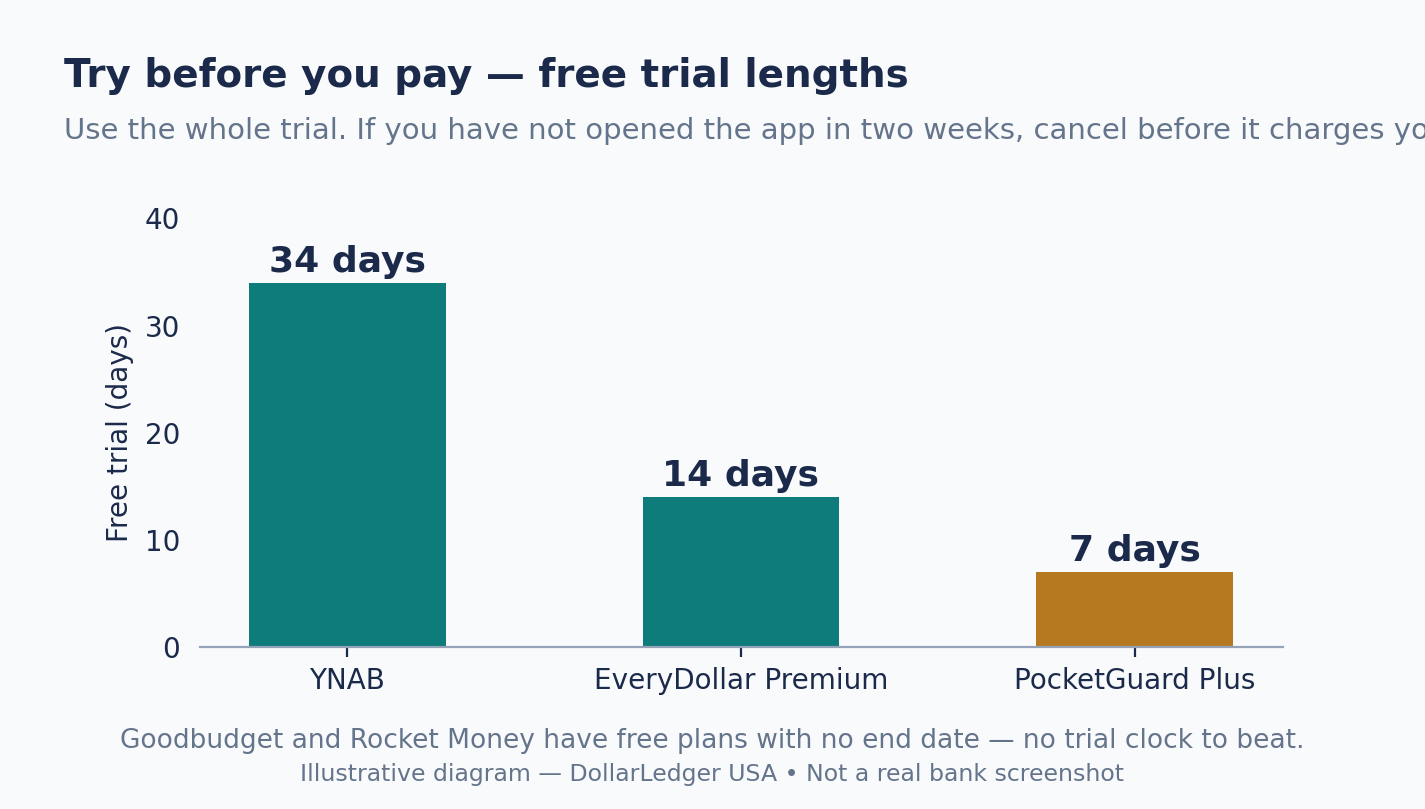
Illustrative diagram — Try before you pay. NOT a real bank screenshot.
Checklist
- I know the yearly price of every app I am considering.
- I know if I want a planner or a tracker.
- I did not download Mint — it shut down March 23, 2024.
- I picked one app that fits my style and know its trial length.
- I will use it two full weeks, including one payday, before paying.
- I set a reminder for the day before any trial ends.
FAQ
Is a paid budgeting app worth $109 a year?
Only if you use it. YNAB at $109 a year is about $9 a month. If it helps you save $30 a month you would otherwise have spent, it pays for itself. If you open it twice and forget it, it is $109 wasted.
Can I budget for free in 2026?
Yes. Rocket Money, Goodbudget and EveryDollar all have free plans with no end date. A spreadsheet also costs nothing. Paying buys convenience — bank syncing and sorting — not the budget itself.
Do budgeting apps move my money?
No. These apps use read-only bank connections: they can see balances and transactions, but cannot move money or make payments.
Which app is best for couples or families?
YNAB covers up to six people on one $109 plan. Goodbudget Premium covers five devices. If you share money, pick an app that shares too.
What happened to Mint?
Intuit shut down Mint on March 23, 2024, after 17 years, and moved users to Credit Karma — which tracks spending and credit, but is not a full budgeting app.
Sources
- The Modern Wallet, “Best Budgeting Apps of 2026” — prices and free plans for all five apps: https://www.themodernwallet.com/roundup/best-budgeting-apps/
- FinanceFeeds, “Best Budgeting Apps 2026” — prices checked on each provider’s own site, September 7, 2026: https://financefeeds.com/the-best-budgeting-apps-of-2026/
- Consumer Financial Protection Bureau, “Budgeting: How to create a budget and stick with it”: https://www.consumerfinance.gov/archive/blog/budgeting-how-to-create-a-budget-and-stick-with-it/
- DollarLedger USA, Best High-Yield Savings Accounts in USA 2026 — where to keep the money you save: </blog/best-high-yield-savings-accounts-in-usa>
Prices checked November 2, 2026; they change — confirm the current price on the app’s own website before you subscribe.
Disclaimer: This article is for education only, not financial advice. Prices change often — confirm the current price on the app’s own website before you subscribe.